# Welcome to NFTEye

All-in-one NFT Analytics & Trading Platform

NFTEye is an actionable NFT analytics platform. Our team consists of distributed system & big data experts, data scientists and NFT degens. We are devoted to developing the best analytics tools for NFT enthusiasts and degens.

<figure><img src="https://2641746840-files.gitbook.io/~/files/v0/b/gitbook-x-prod.appspot.com/o/spaces%2FE51qz0pQscaKZLyxANEv%2Fuploads%2FaB27N8DbMOdP7UT1SS2W%2Foverview.png?alt=media&amp;token=3e1ebada-e6ab-4fa2-81cd-891199b0c1bf" alt=""><figcaption></figcaption></figure>

## Official Links

Mint Page: <https://nfteye.io/lifetime_pass>

Website: <https://nfteye.io/>

Twitter: <https://twitter.com/nfteye_io>

Discord: <https://discord.gg/2dq5w6n2wK>

Youtube: <https://www.youtube.com/@nfteye_io>

Chrome Extension:&#x20;

{% embed url="<https://chrome.google.com/webstore/detail/nfteye/imbkphhpfhkebpifdomcihkcjelnpamo>" %}


# What we do

NFTEye is an all-in-one platform that provides both deep analytics and professional trading suites. With NFTEye Analytics, customers can identify potential opportunities through hot mints, trending collections, bluechip index, and other core metrics & signals. NFTEye Trading Suites also provide services like real-time Sniper, Smart Bidding, etc. to help customers to capture potential opportunities. Our vision is to make NFT trading more intelligent for both professional and retail investors.

{% embed url="<https://www.youtube.com/watch?v=pNGr85gzThw>" %}


# Lifetime Pass Features

Forl full access and better user experience, mint a lifetime here:&#x20;

{% embed url="<https://t.co/nR2saRllCW>" %}

Exclusive features for pass holders only:

### :white\_check\_mark: [**Realtime Sniper & Auto Confirm**](/product-guides/collections/sniper)

<figure><img src="https://2641746840-files.gitbook.io/~/files/v0/b/gitbook-x-prod.appspot.com/o/spaces%2FE51qz0pQscaKZLyxANEv%2Fuploads%2FpiKQNYb8cxg1KLD2JVXc%2Fimage.png?alt=media&amp;token=3b4d0b39-74fa-473d-8b90-8ceed6d4ab66" alt=""><figcaption><p>NFTEye Realtime Sniper &#x26; Auto Confirm</p></figcaption></figure>

### :white\_check\_mark: [**Mintbot**](/product-guides/smart-mint)

<figure><img src="https://2641746840-files.gitbook.io/~/files/v0/b/gitbook-x-prod.appspot.com/o/spaces%2FE51qz0pQscaKZLyxANEv%2Fuploads%2FbK1hQWgJkptBS3J691wW%2FA_3_smart%20mint%20add%20-2-strategy%20on.png?alt=media&amp;token=6bb8f4c4-a637-4988-9e0a-c694b77441df" alt=""><figcaption><p>NFTEye mintbot</p></figcaption></figure>

### :white\_check\_mark:[ Smart bidding](#smart-bidding)

<figure><img src="https://2641746840-files.gitbook.io/~/files/v0/b/gitbook-x-prod.appspot.com/o/spaces%2FE51qz0pQscaKZLyxANEv%2Fuploads%2Fa1q2FHKKLE5X4enwH0wu%2Fimage.png?alt=media&amp;token=13513067-96e5-4a97-80be-c1a7361d7c33" alt=""><figcaption><p>NFTEye Smart Bidding</p></figcaption></figure>

### :white\_check\_mark: [Blur Bidding](/product-guides/blur-bidding)

![](https://2641746840-files.gitbook.io/~/files/v0/b/gitbook-x-prod.appspot.com/o/spaces%2FE51qz0pQscaKZLyxANEv%2Fuploads%2F10JRJCxmQa44RGWFVqrI%2Fimage.png?alt=media\&token=3c389ee2-b6dc-40b8-9cf2-26d4da4b9e5e)![](https://2641746840-files.gitbook.io/~/files/v0/b/gitbook-x-prod.appspot.com/o/spaces%2FE51qz0pQscaKZLyxANEv%2Fuploads%2F2h4Zv5VJj67hosK6Y8oh%2Fimage.png?alt=media\&token=816aeee7-6ebd-4e00-8f6b-ccb8c139d6e2)

<figure><img src="https://2641746840-files.gitbook.io/~/files/v0/b/gitbook-x-prod.appspot.com/o/spaces%2FE51qz0pQscaKZLyxANEv%2Fuploads%2F3ezCafK0jRaLHI2FJ8em%2Fimage.png?alt=media&amp;token=dafdc1d7-c152-4ff7-9a2d-8a39d44e5ed2" alt=""><figcaption><p>Blur Bids Manager</p></figcaption></figure>

### :white\_check\_mark:[ ](/product-guides/alpha-bots)[Smart Buy](/product-guides/smart-buy)

<figure><img src="https://2641746840-files.gitbook.io/~/files/v0/b/gitbook-x-prod.appspot.com/o/spaces%2FE51qz0pQscaKZLyxANEv%2Fuploads%2FWRlcY1zYN1eRgj5VJdYK%2Fimage.png?alt=media&amp;token=e9228e2f-977b-4182-994e-b9d7e06b41ec" alt=""><figcaption><p>NFTEye Smart Buy</p></figcaption></figure>

### :white\_check\_mark:[ Alpha bots](/product-guides/alpha-bots)

Discord Alpha Call

#### ![](https://2641746840-files.gitbook.io/~/files/v0/b/gitbook-x-prod.appspot.com/o/spaces%2FE51qz0pQscaKZLyxANEv%2Fuploads%2FNYde9XrZoB72o2bnV2B3%2Fimage.png?alt=media\&token=f70a114a-a0bd-4e98-b8b7-2e06b8996d19)![](https://2641746840-files.gitbook.io/~/files/v0/b/gitbook-x-prod.appspot.com/o/spaces%2FE51qz0pQscaKZLyxANEv%2Fuploads%2Fr63OMGEmZ0WD6KG0xJNm%2Fimage.png?alt=media\&token=06ddf477-4f85-4736-98a6-65d86a01cfcf)

<figure><img src="https://2641746840-files.gitbook.io/~/files/v0/b/gitbook-x-prod.appspot.com/o/spaces%2FE51qz0pQscaKZLyxANEv%2Fuploads%2F6fderyJWkIYzCV7quTCM%2Fimage.png?alt=media&amp;token=e6e4892a-d865-46d5-873b-afdc312993f2" alt=""><figcaption><p>NFTEye Bluechip Holders Mints/Sells/Buys (In 1 h/4h/8h/24h)</p></figcaption></figure>

<figure><img src="https://2641746840-files.gitbook.io/~/files/v0/b/gitbook-x-prod.appspot.com/o/spaces%2FE51qz0pQscaKZLyxANEv%2Fuploads%2FvQkauJctFUvs2KOQ48zE%2Fimage.png?alt=media&amp;token=97d17b25-c143-4e7a-a637-567976f0bb25" alt=""><figcaption><p>NFTEye NFT-Tool-Holder Moves Bot</p></figcaption></figure>

#### :white\_check\_mark: Whitelist Airdrops

<figure><img src="https://2641746840-files.gitbook.io/~/files/v0/b/gitbook-x-prod.appspot.com/o/spaces%2FE51qz0pQscaKZLyxANEv%2Fuploads%2FstUQaXfywM59NRS3umlo%2Fimage.png?alt=media&amp;token=6b992918-ec54-4207-bec2-9479282a50e2" alt=""><figcaption><p>Antilia Alpha Guranteed Mint Spots</p></figcaption></figure>

<figure><img src="https://2641746840-files.gitbook.io/~/files/v0/b/gitbook-x-prod.appspot.com/o/spaces%2FE51qz0pQscaKZLyxANEv%2Fuploads%2FBLdeKwOXuTDfmbInGbPp%2Fimage.png?alt=media&amp;token=7939cd62-634f-4cb3-9dd3-77398e9f9ddd" alt=""><figcaption><p>Astra Nova Free Mint Spots</p></figcaption></figure>

<figure><img src="https://2641746840-files.gitbook.io/~/files/v0/b/gitbook-x-prod.appspot.com/o/spaces%2FE51qz0pQscaKZLyxANEv%2Fuploads%2FPa4VJ0dSHXxgRHBzlw5S%2Fimage.png?alt=media&amp;token=3803805f-630b-4982-8b96-4e98777bd5de" alt=""><figcaption><p>James's NFT Collection WL Spots</p></figcaption></figure>

<figure><img src="https://2641746840-files.gitbook.io/~/files/v0/b/gitbook-x-prod.appspot.com/o/spaces%2FE51qz0pQscaKZLyxANEv%2Fuploads%2FrrhRiqDh1F5XR9HzREOk%2Fimage.png?alt=media&amp;token=f319831f-6ae1-496f-8164-e73f08f2e9f2" alt=""><figcaption><p>Crypto Simeji WL Spots</p></figcaption></figure>

<figure><img src="https://2641746840-files.gitbook.io/~/files/v0/b/gitbook-x-prod.appspot.com/o/spaces%2FE51qz0pQscaKZLyxANEv%2Fuploads%2F4dc6Ejl5G3HNLdzRIH9u%2Fimage.png?alt=media&amp;token=2f64c661-72b7-4666-9dec-a2ddf8d6599f" alt=""><figcaption><p>Angry Cats WL Spots</p></figcaption></figure>

There's plenty coming! Join our [discord](https://discord.gg/baqHnJ4rbW) for more info.


# Roadmap

Build to the ultimate.

We are releasing new features continuously and the product updates can be seen in our [discord](https://discord.gg/baqHnJ4rbW) almost every week. Recently we have integrated the data from other marketplaces besides Opensea, and optimized the sniper feature etc. No matter it is bullish or bearish, we'll keep building and delivering.

The long time roadmap is as followings. We will make appropriate changes if there are new needs from uses or new trends in market.

<figure><img src="https://2641746840-files.gitbook.io/~/files/v0/b/gitbook-x-prod.appspot.com/o/spaces%2FE51qz0pQscaKZLyxANEv%2Fuploads%2F7OmzKlj1MIHH4z05o3oP%2Fimage.png?alt=media&amp;token=0467079e-caf9-4f25-8d6f-a6303ca66f0e" alt=""><figcaption></figcaption></figure>

## **Phase 1**&#x20;

### [<mark style="color:purple;">**NFTEye Web**</mark> ](https://nfteye.io/)

#### 1.  Smart Bidding&#x20;

Bulk Bidding :white\_check\_mark:

Auto Bidding :white\_check\_mark:

Smart Bidding Strategy Editor :white\_check\_mark:

#### **2. Smart Buy Smart Alerts**

Auto Buy :white\_check\_mark:

Snipe Strategy :hammer:

Gas Preset :white\_check\_mark:

Private Node :white\_check\_mark:

#### **3. Advanced Sniper Feature**

Advanced Holder Charts :white\_check\_mark:

Advanced Sell Wall :white\_check\_mark:

Momentum Charts :white\_check\_mark:

Advanced Listings Charts :white\_check\_mark:

Flips Stats :white\_check\_mark:

#### 4. Hot Mints & Live Mints

Most active mints (sorted by mints) :white\_check\_mark:

Live mints :white\_check\_mark:

Pending Transactions Included :white\_check\_mark:

#### **5. Trait Floor V2.0**&#x20;

#### **6. Smart Tracking.**&#x20;

collection tracking :white\_check\_mark:

address tracking :white\_check\_mark:

Blue Chip Tracking  :hammer:

#### **7. Smart Reveal Management**&#x20;

Manual Reveal Request :white\_check\_mark:

Instant Reveals :white\_check\_mark:

Reveal Alert :hammer:

Reveal Calendar :hammer:

#### 8. Advanced Collection Filters & Sort :white\_check\_mark:

### [<mark style="color:purple;">**NFTEye Chrome Extension**</mark>](https://chrome.google.com/webstore/detail/nfteye/imbkphhpfhkebpifdomcihkcjelnpamo)&#x20;

Rarity Rank :white\_check\_mark:

Buy rank :white\_check\_mark:

Sudoswap Support :white\_check\_mark:

Gas Preset :white\_check\_mark:

## **Phase 2**&#x20;

### <mark style="color:purple;">**NFTEye Web**</mark>&#x20;

#### 1. Bid Manager :white\_check\_mark:

#### 2. Portfolio Management&#x20;

Portfolio Analyzer :hammer:

Wallet Profit Calculation :white\_check\_mark:

Multi Wallets Portfolio Calculation :hammer:

#### 3. Private Node :white\_check\_mark:&#x20;

#### **4. Contract Minting Bot** :white\_check\_mark:

#### 5. Solana Support :hammer:

#### **6. Smart Tracking**&#x20;

Alpha Group Tracking :hammer:

Whale Move :white\_check\_mark:&#x20;

Wallet Tagging :white\_check\_mark:&#x20;

#### 7. Social Data Insights :hammer:&#x20;

#### 8. AI Price Estimation :hammer:

#### 9. UniCart(Marketplace Aggregator)

&#x20;   Opensea :white\_check\_mark:&#x20;

&#x20;   X2Y2 :white\_check\_mark:&#x20;

&#x20;   LooksRare :white\_check\_mark:

&#x20;   Blur :hammer:

#### 10. Light UI Mode :hammer:

#### 11. ERC-1155 Support :hammer:

### <mark style="color:purple;">**NFTEye Chrome Extension**</mark>

#### &#x20;1. Shopping Cart :hammer:

#### 2. Gas Preset :hammer:

#### 3. Smart Reveal Management :hammer:

Instant Reveals&#x20;

Reveal Alert &#x20;

Reveal Calendar &#x20;

Upcoming Drops &#x20;

#### 4. Social Data Insights :hammer:

### <mark style="color:purple;">**Mobile App**</mark> :hammer: &#x20;

#### 1. Collection HUD&#x20;

#### 2. Portfolio Management&#x20;

#### 3. Dashboard&#x20;

#### 4. Smart Tracking&#x20;

#### 5. Smart Notification&#x20;

#### 6. Daily/Weekly Assets Report


# FAQ

### **How do you calculate the rarity?**

We use normalized frequencies of the token's traits. This is the standard approach for calculating rarity in the NFT space.

### **Are the charts live, or do I need to refresh?**

All the charts you see on the page are live. No need to refresh - it's being synced under the hood.

### **What features do you plan to add?**

There's plenty coming! Join our [discord](https://discord.gg/baqHnJ4rbW) for more info.

### **Why can't I find a project?**

At the moment, we decide which projects to feature in NFTEye.\
Join our [discord](https://discord.gg/baqHnJ4rbW) to find upcoming collections or request a new one to be included.

### **Which chains are supported?**

At the moment, we support only Ethereum. We'll be adding more chains in the future.

### Who is the team behind NFTEye?&#x20;

Team consists of distributed system & big data experts, data scientists, and NFT degens. We also closed our seed funding early this year to make sure we are well funded. This round is backed by renowned VCs including Sky9 Capital, IMO Ventures, NGC Ventures, Smrti Lab, and Old Fashion Research.

### What's the difference between single pass and multi passes?

For Mint bot:&#x20;

Single pass holders only have one private node option, multi pass holders will have multi node options to choose. And Auto Gas Feature which can speed up your transactions with one click will open to multi pass holders only.&#x20;

For Auto Bidding:&#x20;

Single pass holders make bids up to 2 collections at the same time, Holders of 2 passes can can make 4 collection While holders of 3 passes can make 6 collections at the same time. Max to auto bid 10 collections at the same time.&#x20;

For Auto Snipe:

Single pass holders make auto snipe up to 2 collections at the same time, holders of 2 passes can make 4 collection at the same time. Max to auto snipe 10 collections at the same time. For partner programs, holders of multiple passes will have a higher chance of getting whitelisted and airdropped.&#x20;

For partner programs, holders of multiple passes will have a higher chance of getting whitelisted and airdropped. For some features like AI Price Prediction, auto listing, multi pass holders getting first dibs. And we plan to open a point system, which is a way to reward for holding multiple.

### **How can I get in touch with the team?**

You can reach us through a [Twitter](https://twitter.com/nfteye_io) DM or in our [discord](https://discord.gg/baqHnJ4rbW) server.


# Collections

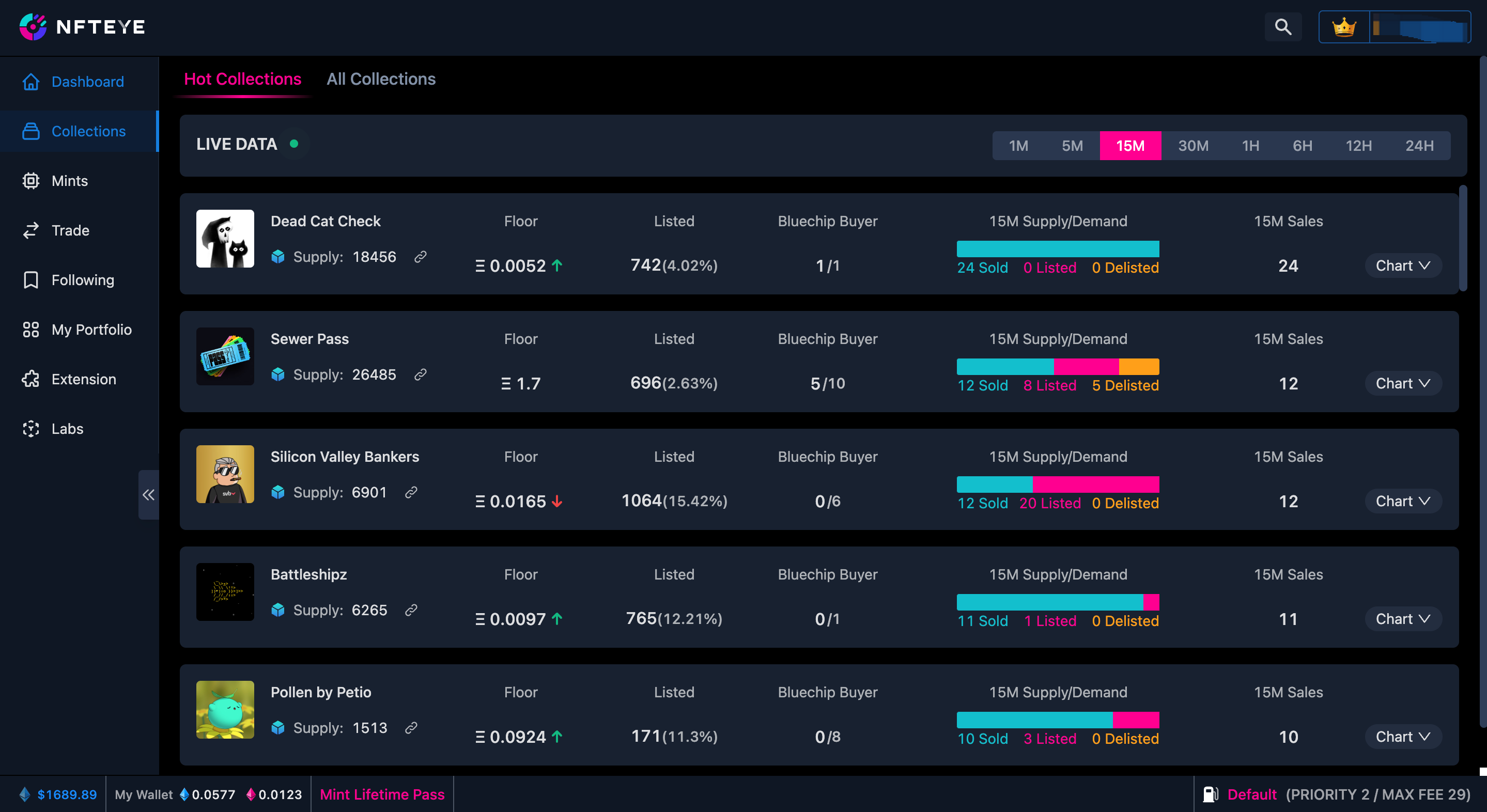
## Hot Collections

<figure><img src="https://2641746840-files.gitbook.io/~/files/v0/b/gitbook-x-prod.appspot.com/o/spaces%2FE51qz0pQscaKZLyxANEv%2Fuploads%2FvaTbiwEB8wXNdb5XI39d%2Fimage.png?alt=media&amp;token=a9b98e97-b1fc-4e2e-8262-8d568457f651" alt=""><figcaption><p>Hot Trendings</p></figcaption></figure>

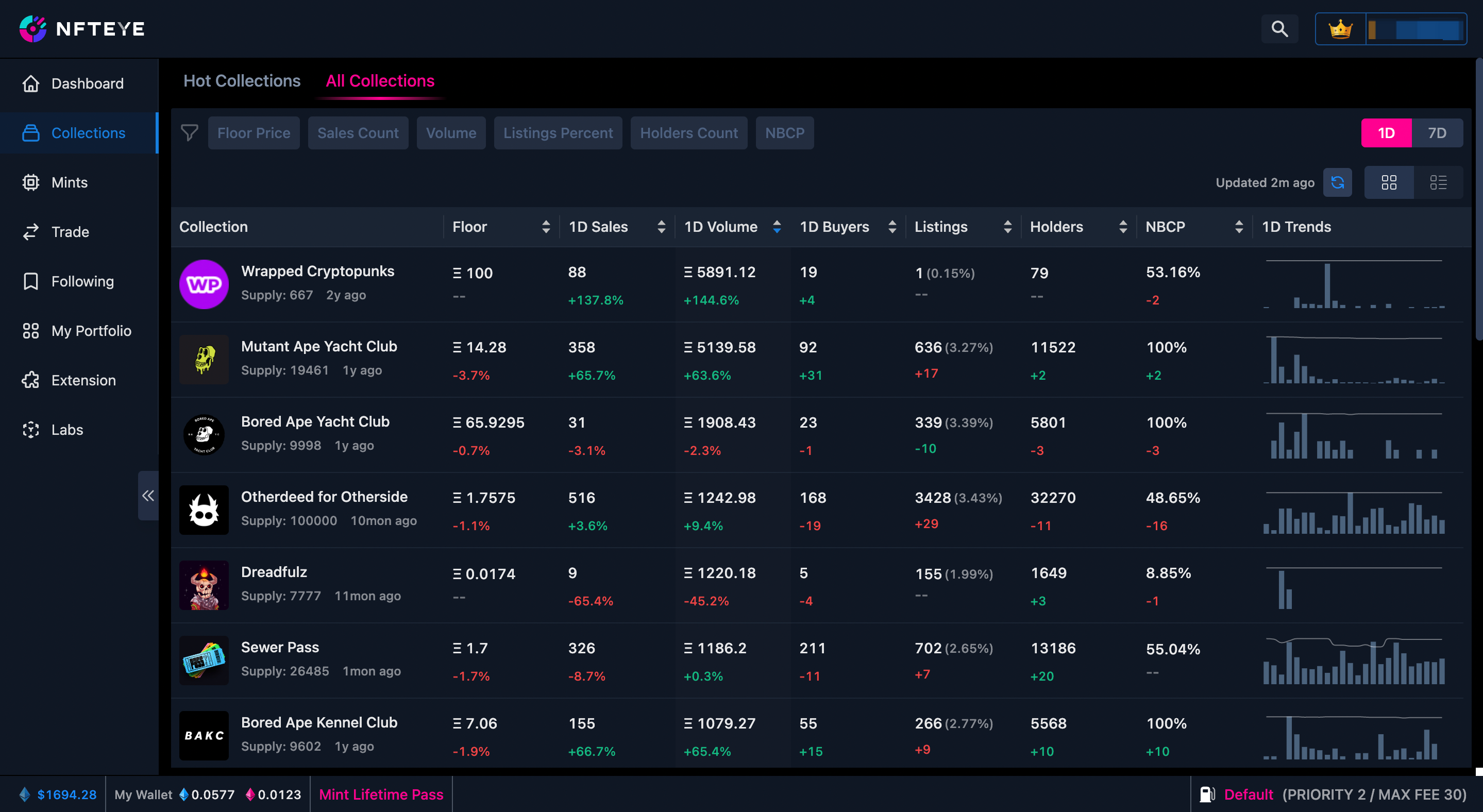
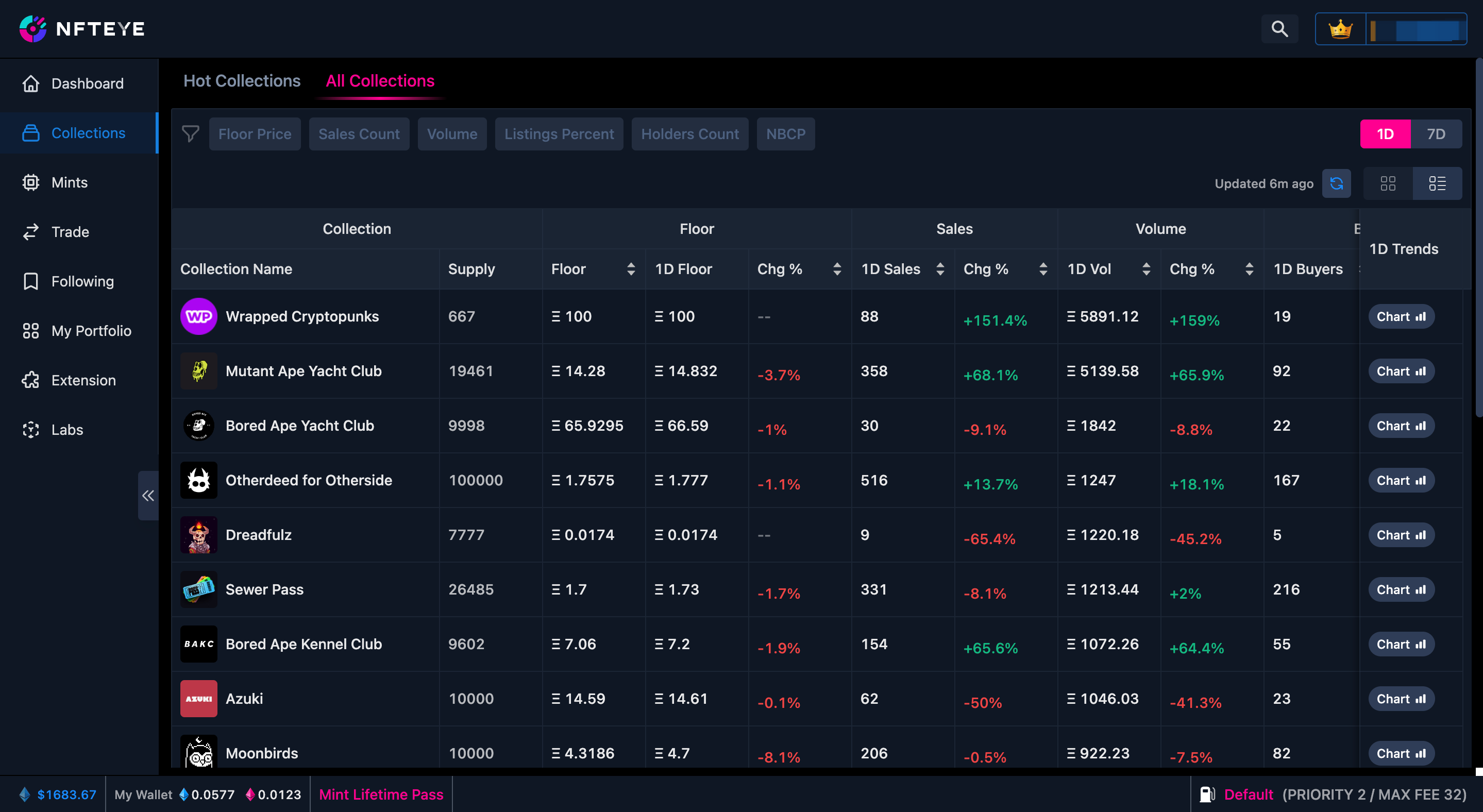
## All Collections

<figure><img src="https://2641746840-files.gitbook.io/~/files/v0/b/gitbook-x-prod.appspot.com/o/spaces%2FE51qz0pQscaKZLyxANEv%2Fuploads%2FTDB0KK1Pchp8LgbHihQg%2Fimage.png?alt=media&amp;token=edaa37af-c6c0-4467-82ce-87fe73ba4d1e" alt=""><figcaption><p>All Collections with Folded Data</p></figcaption></figure>

<figure><img src="https://2641746840-files.gitbook.io/~/files/v0/b/gitbook-x-prod.appspot.com/o/spaces%2FE51qz0pQscaKZLyxANEv%2Fuploads%2FnqlhGgsRLiksvV006nFq%2Fimage.png?alt=media&amp;token=a4526024-bc52-46c6-a892-d8caca353b52" alt=""><figcaption><p>All Collections with Expanded Data</p></figcaption></figure>


# Overview

<figure><img src="https://2641746840-files.gitbook.io/~/files/v0/b/gitbook-x-prod.appspot.com/o/spaces%2FE51qz0pQscaKZLyxANEv%2Fuploads%2F00kHVoMYfLu0ajoKhirI%2Fnfteye-overview-charts-user-guide.png?alt=media&amp;token=15b30a2b-3158-40be-8648-2363898afb3e" alt=""><figcaption><p>NFTEye Overview Charts User Guide</p></figcaption></figure>


# Sniper

## Auto Confirm

In order to help users sniper quickly to the desired listing, we added the **Auto Confirm** feature in Sniper.&#x20;

1️⃣ When **Auto Confirm** mode is enabled, you can buy automatically by clicking the price button with **one click**, no need to pop up metamask.&#x20;

2️⃣ Added security protection strategy. When you click the price to buy, it will detect whether it is a suspicious item again and will **NOT** submit the transaction.&#x20;

3️⃣ For better protection, when you turn on auto-confirm mode, you **MUST** input the maximum price. The system will only submit the transaction below the max price. If the price is higher than the max price, the transaction will **NOT** be submitted.&#x20;

4️⃣ Added the price double check feature, if the purchase price and the listing price not the same, a tooltip will be shown.&#x20;

<figure><img src="https://2641746840-files.gitbook.io/~/files/v0/b/gitbook-x-prod.appspot.com/o/spaces%2FE51qz0pQscaKZLyxANEv%2Fuploads%2FHIWhNd5dGcSS2QR07Tc2%2Fimage.png?alt=media&amp;token=124021ce-01d6-41d0-8327-5b2766ca921d" alt=""><figcaption></figcaption></figure>

## Listings & Sales

### Marketpaces Integration

You can get all listings and sales from **Opensea, X2Y2, Looksrare and Blur**.

<figure><img src="https://2641746840-files.gitbook.io/~/files/v0/b/gitbook-x-prod.appspot.com/o/spaces%2FE51qz0pQscaKZLyxANEv%2Fuploads%2Fvn3791vzS4Vw2Fq9BtfK%2Fimage.png?alt=media&amp;token=8e20598b-07c3-4eeb-b505-8d238d8242ce" alt=""><figcaption></figcaption></figure>

### User Guide

<figure><img src="https://2641746840-files.gitbook.io/~/files/v0/b/gitbook-x-prod.appspot.com/o/spaces%2FE51qz0pQscaKZLyxANEv%2Fuploads%2F9pbEG0jH8xgEJFbPN5Ao%2FNFTEye-Sniper-user-guide%402x.png?alt=media&amp;token=ee3eb0e8-462a-44bc-84ea-0c09ee943492" alt=""><figcaption></figcaption></figure>

### Token Details

Click items on sales list to get token details.

![](https://2641746840-files.gitbook.io/~/files/v0/b/gitbook-x-prod.appspot.com/o/spaces%2FE51qz0pQscaKZLyxANEv%2Fuploads%2FOIntYvffRKNyNWA227hb%2Fimage.png?alt=media\&token=91513934-0719-40cb-a675-d51c929b3e30)![](https://2641746840-files.gitbook.io/~/files/v0/b/gitbook-x-prod.appspot.com/o/spaces%2FE51qz0pQscaKZLyxANEv%2Fuploads%2FitaP4SjtNLLSxE7UPyWW%2Fimage.png?alt=media\&token=205aa462-8b29-4f52-b82b-3f0ddfefa3a8)

## Statistics and Analysis

### Statistics

* View statistics at the top of Sniper, NBCP means percentage of owners who have at least one Blue Chip NFT.

<figure><img src="https://2641746840-files.gitbook.io/~/files/v0/b/gitbook-x-prod.appspot.com/o/spaces%2FE51qz0pQscaKZLyxANEv%2Fuploads%2FZ3LvlYuA4HZpZNjZnLvT%2Fimage.png?alt=media&amp;token=0b765f9b-cddf-4e36-a819-969bfe743b71" alt=""><figcaption></figcaption></figure>

### Floor Depth & Momentum

* Enter a threshold value to see changes in metrics that are below the threshold, including sales, new listings, relisted down, and listers.
* Floor Depth supports more group size options.

![](https://2641746840-files.gitbook.io/~/files/v0/b/gitbook-x-prod.appspot.com/o/spaces%2FE51qz0pQscaKZLyxANEv%2Fuploads%2FPnTyVpcivzfekYUPloOu%2Fimage.png?alt=media\&token=03368c2f-75a1-4433-ab7b-1bb824b9c0dd)![](https://2641746840-files.gitbook.io/~/files/v0/b/gitbook-x-prod.appspot.com/o/spaces%2FE51qz0pQscaKZLyxANEv%2Fuploads%2F0KXhIoouBlRjAxPywiuh%2Fimage.png?alt=media\&token=4044a52a-f4b2-44ba-bf6b-3c5abec5c40c)

### Sell Wall

* You can select group size and span to see the distribution of transaction prices

![](https://2641746840-files.gitbook.io/~/files/v0/b/gitbook-x-prod.appspot.com/o/spaces%2FE51qz0pQscaKZLyxANEv%2Fuploads%2FoAh7WyG3V0wmAvzgjNiX%2Fimage.png?alt=media\&token=97c0eb9c-2ad7-4a98-a502-01c4eae7569b)![](https://2641746840-files.gitbook.io/~/files/v0/b/gitbook-x-prod.appspot.com/o/spaces%2FE51qz0pQscaKZLyxANEv%2Fuploads%2F8zFJ8wKFwnm183RzR7Kv%2Fimage.png?alt=media\&token=645425d9-4117-464a-ae2b-5f25ddc822d1)


# Rank & Reveal

### NFT Rank Icon

For collections on our website, there are three kinds of icons to indentify the status of rank:

1. No icon

No rarity rank yet (NFTs are usually fungible).

<figure><img src="https://2641746840-files.gitbook.io/~/files/v0/b/gitbook-x-prod.appspot.com/o/spaces%2FE51qz0pQscaKZLyxANEv%2Fuploads%2F6WyvnmhJu5cF49Uf9dTS%2Fimage.png?alt=media&amp;token=9c964063-d62a-4ebd-9515-584ce779e3d7" alt=""><figcaption></figcaption></figure>

2\. NFTEye Rank

Rarity rank by NFTEye, close to popular rarity providers.

<figure><img src="https://2641746840-files.gitbook.io/~/files/v0/b/gitbook-x-prod.appspot.com/o/spaces%2FE51qz0pQscaKZLyxANEv%2Fuploads%2FMVNF5N81rEeXJXyD9xdD%2Fimage.png?alt=media&amp;token=d994bbc4-28d1-4ee8-b97f-2a1c6051f12d" alt=""><figcaption><p>NFTEye Rank</p></figcaption></figure>

3\. Collection official rank

100% match the official rarity rank.

<figure><img src="https://2641746840-files.gitbook.io/~/files/v0/b/gitbook-x-prod.appspot.com/o/spaces%2FE51qz0pQscaKZLyxANEv%2Fuploads%2FNnxyzYfFZEvcENS0EBd3%2Fimage.png?alt=media&amp;token=7d77746e-4361-48ad-9a5f-cd8139fea61c" alt=""><figcaption><p>Collection official rank</p></figcaption></figure>

### NFTEye Buy Rank

NFTEye compares rarity rank and listing price to identify the best deals for all on-sale items in collection.

<figure><img src="https://2641746840-files.gitbook.io/~/files/v0/b/gitbook-x-prod.appspot.com/o/spaces%2FE51qz0pQscaKZLyxANEv%2Fuploads%2FiSSqJgnSS4g2Rpq3woem%2Fimage.png?alt=media&amp;token=dc06330c-f522-4dcd-b105-9ef02c222a90" alt=""><figcaption><p>NFTEye Buy Rank</p></figcaption></figure>

### NFTEye Index & Rank Bot

NFTEye gets rank & reveal of collections automatically at most time, you could also ask for rank or reveal manually on our [discord](https://discord.gg/baqHnJ4rbW) server.

<figure><img src="https://2641746840-files.gitbook.io/~/files/v0/b/gitbook-x-prod.appspot.com/o/spaces%2FE51qz0pQscaKZLyxANEv%2Fuploads%2F0hzAILsBIA1TZSns4YrP%2FNFTEye-IndexRank_Bot_User_Guide2x.png?alt=media&amp;token=dee66e16-f763-4ad4-92fb-3f95b8a0637b" alt=""><figcaption></figcaption></figure>


# Blur Bidding

The Blur Bidding feature allows users to view real-time Blur bids data, submit bids, and set automatic cancellation strategy on NFTEye to help users become smarter farmers.

## Blur Bidding Chart

* `Top Bid`: The highest bid on the Collection in blur.
* `Total Value`: The total value of all executable bids.
* `Your Bids`: Your Bid Size.
* `Your Bid Value`: The total amount of your bids.

<figure><img src="https://2641746840-files.gitbook.io/~/files/v0/b/gitbook-x-prod.appspot.com/o/spaces%2FE51qz0pQscaKZLyxANEv%2Fuploads%2Fqp5bg181jemAAI8y1pZt%2Fimage.png?alt=media&amp;token=178fb580-1997-4f87-bf92-9897b1f352d4" alt=""><figcaption></figcaption></figure>

## Place Collection Bid

Click `Place Collection Bid` to submit a bid and set the bid's valid time.

* `Bid Price`: The eth amount of the bid.
* `Size`: The number of bids.
* `Expiration`: The expiration time of the bid you submitted.

You can also submit the same bid by selecting a row from the list to avoid input errors.

<figure><img src="https://2641746840-files.gitbook.io/~/files/v0/b/gitbook-x-prod.appspot.com/o/spaces%2FE51qz0pQscaKZLyxANEv%2Fuploads%2FhVXbWkCcxVNuwYzlHmlv%2Fimage.png?alt=media&amp;token=779ad2aa-87db-4265-988d-4de8c8addf4c" alt=""><figcaption></figcaption></figure>

## Auto Cancel

You can choose to automatically cancel bids when the size of specific bid levels is less than a certain percentage. For example, when a Collection has the following bid prices:

<figure><img src="https://2641746840-files.gitbook.io/~/files/v0/b/gitbook-x-prod.appspot.com/o/spaces%2FE51qz0pQscaKZLyxANEv%2Fuploads%2Fjw4tRb5MgP99jXm7SPXu%2Fimage.png?alt=media&amp;token=1e6be3aa-3f17-4988-88d2-e6f9bc869487" alt=""><figcaption></figcaption></figure>

If you choose the 0.27E bid price, which currently has 401 bids, you can set the strategy to cancel the bid automatically when the Bid Price's Size is ≤ `80` % of `401`.

<figure><img src="https://2641746840-files.gitbook.io/~/files/v0/b/gitbook-x-prod.appspot.com/o/spaces%2FE51qz0pQscaKZLyxANEv%2Fuploads%2FKeeXaC1LrAqbxvUiaRNV%2Fimage.png?alt=media&amp;token=f4c2b107-57ef-4c35-8980-5adb96f1b248" alt=""><figcaption></figcaption></figure>

After setting it, the system will automatically cancel the bid when the number of bids in the 0.27E bid price is less than 320 (80% of 401).\
\
The most important is, <mark style="color:red;">**YOU DON'T NEED TO KEEP THIS PAGE LIVE**</mark>, you can find your next target or close the web page, Auto Cancel Bot will be triggered automatically.

<figure><img src="https://2641746840-files.gitbook.io/~/files/v0/b/gitbook-x-prod.appspot.com/o/spaces%2FE51qz0pQscaKZLyxANEv%2Fuploads%2F1jIId7A04x1su90U1B06%2Fimage.png?alt=media&amp;token=9a8d93e8-b90a-46c5-95d1-6d6d7d843b3e" alt=""><figcaption></figcaption></figure>

Activity will display the logs that you monitor and execute. When you click `Save and start monitoring` , monitoring will begin, and if the strategy matches, it will be executed automatically.

When the strategy you set is triggered, the Auto Cancel button will show a "Matched" status, indicating that the strategy has been matched and executed.

<figure><img src="https://2641746840-files.gitbook.io/~/files/v0/b/gitbook-x-prod.appspot.com/o/spaces%2FE51qz0pQscaKZLyxANEv%2Fuploads%2FzJqlpBw3LNGJZfduVhqJ%2Fimage.png?alt=media&amp;token=3538ba95-f0b8-41d2-bfd0-2f00ad2442a3" alt=""><figcaption></figcaption></figure>

## <mark style="color:red;">Following Bid Size Mode</mark>

On the basis of the original cancel strategy, we added a <mark style="color:red;">**Following Bid Size Mode**</mark>.

Your auto cancel strategy will adapt to the increase of Bid Size at the target bid price.

If you choose the Following Bid Size, your auto cancel strategy will always be triggered when the bid size is reduced to 90% of the latest recorded value.&#x20;

The point is that as long as the bid size increases and then decreases to 90%, the cancellation strategy will be triggered.

<figure><img src="https://2641746840-files.gitbook.io/~/files/v0/b/gitbook-x-prod.appspot.com/o/spaces%2FE51qz0pQscaKZLyxANEv%2Fuploads%2Fzozlv6fFo2vZ3WUEOiuI%2Fimage.png?alt=media&amp;token=c74f31fb-13be-4a2a-94c9-ee9ed5a2eda3" alt=""><figcaption></figcaption></figure>


# User Guide

{% content-ref url="/pages/ytTiTZSGz8tVYRk07807" %}
[Place Blur Bids & Auto Cancel](/product-guides/blur-bidding/user-guide/place-blur-bids-and-auto-cancel)
{% endcontent-ref %}

{% content-ref url="/pages/xUiCBbC8qK5ihtoIYm2A" %}
[Blur Bids Manager](/product-guides/blur-bidding/user-guide/blur-bids-manager)
{% endcontent-ref %}


# Place Blur Bids & Auto Cancel

How to Find Targets and Place Bids on NFTEye?

## Find Trending Collections and Place Blur Bids

### 1. Find Trending Collections in [Hot Collections](https://nfteye.io/collections/hot)

In Hot Collection, view real-time hot projects. You can view Supply and Demand data in 5-minute and 15-minute dimensions.

1. `Listed`: The number and proportion of all items on the Market.
2. `Bluechip Buyer`: Bluechip buyer/Buyers. Bluechip Buyer refers to buyers who hold blue-chip projects (BAYC, AZUKI, etc.). The more Bluechip Buyers, the more positive the signal.
3. `5M Supply/Demand` View the sales and listings in the past 5 minutes. Pay special attention to the number of cancelled listings. The more cancelled listings, the more positive the signal.

<figure><img src="https://2641746840-files.gitbook.io/~/files/v0/b/gitbook-x-prod.appspot.com/o/spaces%2FE51qz0pQscaKZLyxANEv%2Fuploads%2FYrYLFWCHNPwDilEV4fJo%2Fimage.png?alt=media&amp;token=d53f0f7e-09f1-4ba3-a940-958aed7ae79d" alt=""><figcaption><p>NFTEye Hot Collections</p></figcaption></figure>

### 2. View Real-time Transaction Data and Charts in [Sniper Page](https://nfteye.io/collections/nakamigos/sniper)

1. Listings will display Pending transaction badges (including direct purchases and offer transactions), whether they are discounted sales, and whether they are loss-making listings.
2. View the change curve of Realtime Floor.
3. The right side will display the market of the transaction, the price of the previous transaction, and the PnL% of the transaction.

<figure><img src="https://2641746840-files.gitbook.io/~/files/v0/b/gitbook-x-prod.appspot.com/o/spaces%2FE51qz0pQscaKZLyxANEv%2Fuploads%2F6cuswQTaf0iMi0XShOnq%2Fimage.png?alt=media&amp;token=0015ecf5-7026-4811-8c47-1b600f3fd96a" alt=""><figcaption><p>NFTEye Sniper Page</p></figcaption></figure>

### 3. Place Blur Bids

1. Click this to Place Bids, Or you can click any Price to get the Bid Template, to avoid input errors.

<figure><img src="https://2641746840-files.gitbook.io/~/files/v0/b/gitbook-x-prod.appspot.com/o/spaces%2FE51qz0pQscaKZLyxANEv%2Fuploads%2FpBhMXiCtNn1nq8q5eXV6%2Fimage.png?alt=media&amp;token=513313b9-7afb-4f87-81e5-e6bf79f04c73" alt=""><figcaption><p>NFTEye Blur Bids</p></figcaption></figure>

2. Set Bids Expiration

<figure><img src="https://2641746840-files.gitbook.io/~/files/v0/b/gitbook-x-prod.appspot.com/o/spaces%2FE51qz0pQscaKZLyxANEv%2Fuploads%2Fxmu5tvvled43fd0i9Ji3%2Fimage.png?alt=media&amp;token=384016ec-dc72-4477-b8c7-4cee4712149e" alt=""><figcaption><p>NFTEye Blur Bids</p></figcaption></figure>

3. Confirm and Sign

<figure><img src="https://2641746840-files.gitbook.io/~/files/v0/b/gitbook-x-prod.appspot.com/o/spaces%2FE51qz0pQscaKZLyxANEv%2Fuploads%2F3bcJtWRc5BxwOnrNB8dK%2Fimage.png?alt=media&amp;token=6d654485-5c28-45dd-b2b4-341e695b108d" alt=""><figcaption><p>NFTEye Blur Bids</p></figcaption></figure>

### 4. Set the Auto Cancel Strategy

1. Click Auto Cancel

<figure><img src="https://2641746840-files.gitbook.io/~/files/v0/b/gitbook-x-prod.appspot.com/o/spaces%2FE51qz0pQscaKZLyxANEv%2Fuploads%2FjGIDKs89xO7zegxOWbTf%2Fimage.png?alt=media&amp;token=afc3623b-5f3b-42d5-907c-dfe1486baf39" alt=""><figcaption><p>NFTEye Blur Bids Auto Cancel</p></figcaption></figure>

2. Choose Bid Price

<figure><img src="https://2641746840-files.gitbook.io/~/files/v0/b/gitbook-x-prod.appspot.com/o/spaces%2FE51qz0pQscaKZLyxANEv%2Fuploads%2FCCjgCn63onBuoJRotHNr%2Fimage.png?alt=media&amp;token=1de7e98a-747a-43fd-ba11-7f09eb0f55f7" alt=""><figcaption><p>NFTEye Blur Bids Auto Cancel</p></figcaption></figure>

3. Set Cancel Strategy

Set the cancel strategy according to your own investment preferences.

<figure><img src="https://2641746840-files.gitbook.io/~/files/v0/b/gitbook-x-prod.appspot.com/o/spaces%2FE51qz0pQscaKZLyxANEv%2Fuploads%2FRAhELs7vX53IV1SNSnU2%2Fimage.png?alt=media&amp;token=d41a1328-98dd-4cfc-884a-b9aa14cfbd77" alt=""><figcaption><p>NFTEye Blur Bids Auto Cancel</p></figcaption></figure>

### <mark style="color:red;">**Choose Following Bid Size Mode**</mark>

As long as the bid size increases and then decreases to 90%, the cancellation strategy will be triggered.

<figure><img src="https://2641746840-files.gitbook.io/~/files/v0/b/gitbook-x-prod.appspot.com/o/spaces%2FE51qz0pQscaKZLyxANEv%2Fuploads%2Fd97CzSvC0SBaKR8SRcoe%2Fimage.png?alt=media&amp;token=f391cfe7-69a2-454a-9caa-a17af121da28" alt=""><figcaption><p>NFTEye Blur Bids Auto Cancel</p></figcaption></figure>

4. Save and Start

<figure><img src="https://2641746840-files.gitbook.io/~/files/v0/b/gitbook-x-prod.appspot.com/o/spaces%2FE51qz0pQscaKZLyxANEv%2Fuploads%2FC07sJMQKrXznmWVgr8YN%2Fimage.png?alt=media&amp;token=73b7b235-ac4a-4e55-9f56-5f3b90e44ad8" alt=""><figcaption><p>NFTEye Blur Bids Auto Cancel</p></figcaption></figure>

5. You can Delete Strategy and Reset it

<figure><img src="https://2641746840-files.gitbook.io/~/files/v0/b/gitbook-x-prod.appspot.com/o/spaces%2FE51qz0pQscaKZLyxANEv%2Fuploads%2FDCs6oSqKPoZ6o720fhCl%2Fimage.png?alt=media&amp;token=4d531ef0-db36-443e-87e8-59ac9bd4d3ce" alt=""><figcaption><p>NFTEye Blur Bids Auto Cancel</p></figcaption></figure>

6. Auto Monitoring

<mark style="color:red;">**YOU DON'T NEED TO KEEP THIS PAGE LIVE**</mark>, you can find your next target or close the web page, Auto Cancel Bot will be triggered automatically.

<figure><img src="https://2641746840-files.gitbook.io/~/files/v0/b/gitbook-x-prod.appspot.com/o/spaces%2FE51qz0pQscaKZLyxANEv%2Fuploads%2FzRU5t3UWaLVu1PH5cCQp%2Fimage.png?alt=media&amp;token=9ef0d0fe-4ee2-45bd-b3ee-ce236f366a7a" alt=""><figcaption><p>NFTEye Blur Bids</p></figcaption></figure>

7. Mached

<figure><img src="https://2641746840-files.gitbook.io/~/files/v0/b/gitbook-x-prod.appspot.com/o/spaces%2FE51qz0pQscaKZLyxANEv%2Fuploads%2FrBiYqfxTlFw0e1aUle9D%2Fimage.png?alt=media&amp;token=791ba118-4de9-444e-b8cc-31ab8dcd9e98" alt=""><figcaption><p>NFTEye Blur Bids</p></figcaption></figure>


# Blur Bids Manager

You can place blur bids, cancel bids, set auto cancel strategy and check all your strategy activities in this page.

## 1.Go to Trade Section

<figure><img src="https://2641746840-files.gitbook.io/~/files/v0/b/gitbook-x-prod.appspot.com/o/spaces%2FE51qz0pQscaKZLyxANEv%2Fuploads%2FhLIQkk7I7WLBYbrTpvJb%2FwsdaPEp0jW.jpg?alt=media&amp;token=f9dbdf43-9804-4023-86de-3a3fe903537f" alt=""><figcaption><p>NFTEye Blur Bids Manager</p></figcaption></figure>

## 2.Add Blur Bids

Search Collection via *collection name* or *contract address*, then Place Bids.

<figure><img src="https://2641746840-files.gitbook.io/~/files/v0/b/gitbook-x-prod.appspot.com/o/spaces%2FE51qz0pQscaKZLyxANEv%2Fuploads%2FZwogj9Aq72cA6uNufxKH%2Fimage.png?alt=media&amp;token=0b9a3ac5-51ae-454b-b19b-cab9650299fa" alt=""><figcaption><p>NFTEye Blur Bids Manager</p></figcaption></figure>

<figure><img src="https://2641746840-files.gitbook.io/~/files/v0/b/gitbook-x-prod.appspot.com/o/spaces%2FE51qz0pQscaKZLyxANEv%2Fuploads%2FW4WlLdzlIO2njy85CyXl%2Fimage.png?alt=media&amp;token=2db45544-0f39-4c4b-8f70-47d8c3c91dc4" alt=""><figcaption><p>NFTEye Blur Bids Manager</p></figcaption></figure>

## 3.Set an Automatic Cancel Strategy

You can delete or set a cancel strategy here.

<figure><img src="https://2641746840-files.gitbook.io/~/files/v0/b/gitbook-x-prod.appspot.com/o/spaces%2FE51qz0pQscaKZLyxANEv%2Fuploads%2FAEYB7fqJNttoEFou1qQi%2Fimage.png?alt=media&amp;token=11a4b3be-827b-4d16-bb6b-145b3a8988de" alt=""><figcaption><p>NFTEye Blur Bids Manager</p></figcaption></figure>

## 4.Check All Your Strategy Actitivities

<figure><img src="https://2641746840-files.gitbook.io/~/files/v0/b/gitbook-x-prod.appspot.com/o/spaces%2FE51qz0pQscaKZLyxANEv%2Fuploads%2FZbAShDJ4WAlY49AdDFln%2Fimage.png?alt=media&amp;token=59f1df28-3296-452a-8529-48df96b416ff" alt=""><figcaption><p>NFTEye Blur Bids Manager</p></figcaption></figure>

You can filter the activities by Collection name or Status.

<figure><img src="https://2641746840-files.gitbook.io/~/files/v0/b/gitbook-x-prod.appspot.com/o/spaces%2FE51qz0pQscaKZLyxANEv%2Fuploads%2FU7zQcxmnKvpdcUlfU78r%2Fimage.png?alt=media&amp;token=523959e2-8e9f-4a6b-8e86-64259a04951a" alt=""><figcaption><p>NFTEye Blur Bids Manager</p></figcaption></figure>


# FAQ

### Q: Can NFTEye Blur Bids Auto Cancel help me completely avoid farming risks?

A: **It is important to note that the acceptance of Blur Bids is randomized and not based on the time of submission.**

For instance, suppose there are 1000 sizes available at 0.1 ETH, and one of them is yours. In that case, if an offer is accepted, there is still a 0.1% chance that it will be your bid. This acceptance logic of Blur is entirely random.

To avoid such situations, you can place a bid at the second bid price and set the auto cancel strategy on the max bid price.&#x20;

In addition, the bid size changes all the time. After setting an auto cancel strategy, you need to check and adjust it in time.

### Q: What factors affect Blur Points you farmed?

A: Blur points farm is positively correlated with these factors: 1 Day Volume, Bid Price, Bid Expiration and Bid Size.

### &#x20;Q: How to set Auto Cancel Strategy?

A: You can apply different strategies based on your individual situation.

For example, if the current highest bid level is 0.2 ETH with a size of 100, and the second-highest bid level is 0.19 ETH with a size of 200:&#x20;

1\. If you want lower risk, you can bid at 0.19 ETH and set a cancellation strategy: when the size of the highest bid level (0.2 ETH) drops to 10% or less, your bid (0.19 ETH) will be automatically cancelled.&#x20;

2\. If you want higher returns, you can bid at 0.2 ETH and set a cancellation strategy: when the size of the highest bid level (0.2 ETH) drops to 80% or less, your bid (0.2 ETH) will be automatically cancelled.<br>

### Q: Is the Auto Cancel Strategy working even though bids are non executable?

A: The status of the auto-cancelation remains valid regardless of whether or not you have placed a bid. Once the conditions are met, the system will cancel all your bids even if you haven't placed any. This is a great way to do a dry run test before actually placing a bid.

### &#x20;Q: Will the Auto Cancel feature cancel all bids on a collection? Or only bids for the specified target bid price?

A: It will cancel all bids on a collection.

### &#x20;Q: Must my PC be active for the monitoring for blur bids to be functioning?

A: No, you don't need to keep your PC and sniper page open for blur bids.

### &#x20;Q: How many times do I need to sign when using the Blur Bids feature on NFTEye?

A: 1. You will need to sign if you are not logged in NFTEye or Blur.

2. You will also need to sign every time you submit bids.&#x20;

### &#x20;Q: Where are the bidding funds held? On my wallet or Blur?

A: On Blur Pool Balance.

### &#x20;Q: Why am I getting an "Insufficient funds" message when trying to place a bid?

A: You need to assure that there is enough ETH on your Blur Pool Balance.

### &#x20;Q: Do I need the pass for Blur Bids Auto Cancel feature?

A: It's still **FREE** for all users until **Apr. 5th**.


# Smart Bidding

## Add Bid Task

1. Search a collection via Project Name / Contract Address
2. Select an offer type: **Collection Offer**, **Trait Offer**, **Custom Filter**

<figure><img src="https://2641746840-files.gitbook.io/~/files/v0/b/gitbook-x-prod.appspot.com/o/spaces%2FE51qz0pQscaKZLyxANEv%2Fuploads%2Fr1Ei1SFWStfh40whlAey%2Fimage.png?alt=media&amp;token=7a5113b5-d38a-4864-8a33-4e3c52b68cd1" alt=""><figcaption><p>NFTEye Smart Bidding</p></figcaption></figure>

#### Collection offer

You can make one offer that applies to all NFT items in one collection. A particular collection offer can only be accepted once and will expire for all other NFTs in the collection after being accepted.

#### Trait Offer

If the collection owner turned on the attribute-based collection offers, you’ll be able to select a specific trait and send a collection offer to all applicable NFTs with that trait.

#### Custom Filter

Bids will be placed item by item. Custom filter is slower than collection offers and trait offers, and is suitable for bidding on a small number of items with multiple filters.

## Bid Strategy Setup

#### Fixed Bids

With the "Fixed Bids" strategy, the system only uses your exact bid price.

<figure><img src="https://2641746840-files.gitbook.io/~/files/v0/b/gitbook-x-prod.appspot.com/o/spaces%2FE51qz0pQscaKZLyxANEv%2Fuploads%2FrzybPundFDrYHHEqTBfM%2Fimage.png?alt=media&amp;token=ec28b21d-0724-4446-9887-8000d864f4b7" alt=""><figcaption><p>NFTEye Smart Bidding</p></figcaption></figure>

#### Dynamic Bids

With the "Dynamic Bids" strategy, the system will place your bid price based on your specified percentage of the floor price.

&#x20; e.g., Enter a percentage of the floor price. If you enter 60%, you will bid at 0.6 ETH when the floor price is 1 ETH, which is calculated as 1ETH \* 60% = 0.6ETH.

<figure><img src="https://2641746840-files.gitbook.io/~/files/v0/b/gitbook-x-prod.appspot.com/o/spaces%2FE51qz0pQscaKZLyxANEv%2Fuploads%2FkqPnc4WWh7s6W4TXEoPJ%2Fimage.png?alt=media&amp;token=9b759100-0504-4481-bb69-bc96d8d81ff4" alt=""><figcaption><p>NFTEye Smart Bidding</p></figcaption></figure>

#### Stop Price

If stop price mode turned ON, it will stop submitting new bidding task when floor ≤ minimum price or floor ≥ maximum price you set.&#x20;

#### Competitive Mode

Competitive mode will check the highest bid of the collection offer before the task is submitted, and bids higher than the existing highest bidder for a small amount (0.00001), up to max bid price limit.&#x20;

The Competitive Mode currently only supports two bid types: **Collection Offer** and **Trait Offer.**

#### Auto Bid

If auto bidding mode is enabled, signs will be made automatically using the burning wallet you have selected. If auto bidding mode is NOT enabled, it will use your login wallet for manual signature.&#x20;

*Please DO NOT enter the private key of your main wallet, you can use a burner wallet or create a new wallet specifically for auto bidding.*

<figure><img src="https://2641746840-files.gitbook.io/~/files/v0/b/gitbook-x-prod.appspot.com/o/spaces%2FE51qz0pQscaKZLyxANEv%2Fuploads%2FBM7r4PzT7hWa6a363qbW%2Fimage.png?alt=media&amp;token=ae46290d-3430-4d61-a976-f6cb2776d0b4" alt=""><figcaption><p>NFTEye Smart Bidding</p></figcaption></figure>

## Preview & Submit

<figure><img src="https://2641746840-files.gitbook.io/~/files/v0/b/gitbook-x-prod.appspot.com/o/spaces%2FE51qz0pQscaKZLyxANEv%2Fuploads%2FeCs7U9x5DtaTiH8946lV%2Fimage.png?alt=media&amp;token=851d8ed6-8d6d-4981-82b6-4b30b696b004" alt=""><figcaption><p>NFTEye Smart Bidding</p></figcaption></figure>

<figure><img src="https://2641746840-files.gitbook.io/~/files/v0/b/gitbook-x-prod.appspot.com/o/spaces%2FE51qz0pQscaKZLyxANEv%2Fuploads%2FNlLR1JvReHwj2n21ybpx%2Fimage.png?alt=media&amp;token=623c7ad1-644b-40c6-b4a9-f7deb6b828f4" alt=""><figcaption><p>NFTEye Smart Bidding</p></figcaption></figure>

## **FAQ**

#### **What is the bidding limit?**&#x20;

The minimum offer amount is $5 USD for ETH. You can have active offers for 1000x the balance of your wallet. If you have 1WETH in your wallet, the value of your all active bids can max be 1000WETH.&#x20;

#### How many bid tasks can I create maximum?

Unlimited.

#### Why can't I use trait offer when the collection has traits?

If the collection owner turned on the attribute-based collection offers, you’ll be able to select a specific trait and send a collection offer to all applicable NFTs with that trait. If not, you won't be able to use it.


# Notification

Click the 🔔 icon to grasp all your item activities at a glance without entering the subpage.

<figure><img src="https://2641746840-files.gitbook.io/~/files/v0/b/gitbook-x-prod.appspot.com/o/spaces%2FE51qz0pQscaKZLyxANEv%2Fuploads%2FJQJBYmpVWnRUOX0tQVtd%2Fimage.png?alt=media&amp;token=3a02cf1f-1b8d-4fcf-921f-3dc05dbebf48" alt=""><figcaption><p>NFTEye Notification</p></figcaption></figure>

You can check these types of activity in the upper right corner now:

* Cancel Strategy Matched
* Item Sold
* Bid Accepted

Notification details including Rarity Rank, Activity Type, Transaction Price, Transaction Time, and Trading Market will be displayed on the panel.

You can also click the market icon <img src="https://2641746840-files.gitbook.io/~/files/v0/b/gitbook-x-prod.appspot.com/o/spaces%2FE51qz0pQscaKZLyxANEv%2Fuploads%2F35eRtRb0cSm55XyUxoku%2F20230427-151243.jpeg?alt=media&amp;token=ca945977-f4a6-44be-b7fe-6c91f34ae1dd" alt="" data-size="line"> to redirect to the corresponding marketplace.

<figure><img src="https://2641746840-files.gitbook.io/~/files/v0/b/gitbook-x-prod.appspot.com/o/spaces%2FE51qz0pQscaKZLyxANEv%2Fuploads%2FSqIGaSruRQtwUtIIkiSJ%2Fimage.png?alt=media&amp;token=ebfac0e7-2102-45c8-b24f-e3d5fc78e297" alt=""><figcaption><p>NFTEye Notification</p></figcaption></figure>


# Alpha Bots

### Bots in NFTEye Discord

#### 1. Alpha Call Bot (Holders Only)

Alpha Info alert of potential hot collections to catch the Flip opportunity!

![](https://2641746840-files.gitbook.io/~/files/v0/b/gitbook-x-prod.appspot.com/o/spaces%2FE51qz0pQscaKZLyxANEv%2Fuploads%2FyOHZGiTrRPDBEMTE3S9w%2Fimage.png?alt=media\&token=2489e56d-4686-4e0c-965b-b2b8b1d340cc)![](https://2641746840-files.gitbook.io/~/files/v0/b/gitbook-x-prod.appspot.com/o/spaces%2FE51qz0pQscaKZLyxANEv%2Fuploads%2Fr63OMGEmZ0WD6KG0xJNm%2Fimage.png?alt=media\&token=06ddf477-4f85-4736-98a6-65d86a01cfcf)

Check the example: <https://twitter.com/nfteye_io/status/1621051362690887681>

#### 2. Bluechip-holder-moves (Holders Only)

Alpha of what collections the bluechip holders mint/sell/buy in 1h/4h/8h/12h/24h

<figure><img src="https://2641746840-files.gitbook.io/~/files/v0/b/gitbook-x-prod.appspot.com/o/spaces%2FE51qz0pQscaKZLyxANEv%2Fuploads%2FMvjI0gGRj40cOZgipDST%2Fimage.png?alt=media&amp;token=8aff301e-78ac-4325-af1a-9d396398c9a3" alt=""><figcaption><p>NFTEye Bluechip-holder-moves Bot</p></figcaption></figure>

#### 2.  NFT-Tool-Holder Moves (Holders Only)

Alpha of what collections the tool holders mint/sell/buy in 1h/4h/8h/12h/24h

<figure><img src="https://2641746840-files.gitbook.io/~/files/v0/b/gitbook-x-prod.appspot.com/o/spaces%2FE51qz0pQscaKZLyxANEv%2Fuploads%2FADmqJ8HUwSEAjvKq6qxW%2Fimage.png?alt=media&amp;token=f535de92-6e98-4bfc-acc4-770a3601e1ab" alt=""><figcaption><p>NFTEye NFT-Tool-Holder Moves Bot</p></figcaption></figure>

#### 3. Whale Moves

Alpha for whale's massive buy

<figure><img src="https://2641746840-files.gitbook.io/~/files/v0/b/gitbook-x-prod.appspot.com/o/spaces%2FE51qz0pQscaKZLyxANEv%2Fuploads%2FqnfisiVKvNfshFHL4X0G%2Fimage.png?alt=media&amp;token=79f7248d-8ad8-4bec-af4a-11719703e853" alt=""><figcaption><p>NFTEye Whale Moves Bot</p></figcaption></figure>

#### 4. Hot-Mints

Hot Mints tracker for top mints from past 5min/10min/15min

<figure><img src="https://2641746840-files.gitbook.io/~/files/v0/b/gitbook-x-prod.appspot.com/o/spaces%2FE51qz0pQscaKZLyxANEv%2Fuploads%2FNy5kfKZcEARJJSr21zI7%2Fimage.png?alt=media&amp;token=774abc2c-ee29-460d-afd5-d50318470325" alt=""><figcaption><p>NFTEye Hot-Mints Bot</p></figcaption></figure>


# Smart Buy

* Smart Buy feature now supports automatic purchasing listings on Blur, Opensea, X2Y2 and Looksrare.
* Click Ignore suspicious tokens button to skip suspicious items when smart buy.

<figure><img src="https://2641746840-files.gitbook.io/~/files/v0/b/gitbook-x-prod.appspot.com/o/spaces%2FE51qz0pQscaKZLyxANEv%2Fuploads%2FyXdSBQppEEXDBqbB5ANO%2Fimage.png?alt=media&amp;token=8e9f9a04-adbc-4885-b58a-0817e186e9b6" alt=""><figcaption></figcaption></figure>

### Tutorial

{% embed url="<https://youtu.be/DsP721hKpTA>" %}


# Smart Mint

## **Tutorial**

{% embed url="<https://youtu.be/pDv95Mynkxg>" %}
NFTEye Mintbot Guide
{% endembed %}

### 1. Set Up Burner Wallets

On Mint Bot Page, you can add multi burner wallets. We recommend you use **burner wallet** when you are using features like Auto Bidding / Auto Mint that require a wallet private key. DO NOT store an exorbitant amount of crypto in your burner wallet.

<figure><img src="https://2641746840-files.gitbook.io/~/files/v0/b/gitbook-x-prod.appspot.com/o/spaces%2FE51qz0pQscaKZLyxANEv%2Fuploads%2FomYvmSjj4b7PJbjpFjuQ%2Fimage.png?alt=media&amp;token=b2b5e8e7-ca32-4f13-995a-63dc6d2061b3" alt=""><figcaption></figcaption></figure>

<figure><img src="https://2641746840-files.gitbook.io/~/files/v0/b/gitbook-x-prod.appspot.com/o/spaces%2FE51qz0pQscaKZLyxANEv%2Fuploads%2Fopt86Zfbvn51c2FOr7Fg%2Fimage.png?alt=media&amp;token=296ff6f1-1ada-4661-8c15-e08c15c756a5" alt=""><figcaption></figcaption></figure>

### 2. Set Up a Mint Task

Click **Add Mint,** and then you can set up a mint bot in three easy steps.

**Step 1. Add Basic Contract info**

① Enter a name for your task, we recommend you use the name of the collection you want to mint, something like **Goblin Mint.**

<figure><img src="https://2641746840-files.gitbook.io/~/files/v0/b/gitbook-x-prod.appspot.com/o/spaces%2FE51qz0pQscaKZLyxANEv%2Fuploads%2FEWTKxjultXsNn0cFPHJ2%2Fimage.png?alt=media&amp;token=b678b6cd-aac4-407c-b807-cfc3d0e7e1c2" alt=""><figcaption></figcaption></figure>

② Enter the **contract address** of the collection you want to mint (please make sure it is the correct address).

<figure><img src="https://2641746840-files.gitbook.io/~/files/v0/b/gitbook-x-prod.appspot.com/o/spaces%2FE51qz0pQscaKZLyxANEv%2Fuploads%2F8mLjcir6iz6ux13JRO8j%2Fimage.png?alt=media&amp;token=1e4ae6ef-3187-46ba-aeed-636551b08e2d" alt=""><figcaption></figcaption></figure>

③ Select the Mint Function and enter the parameters for the mint function. We take all the write functions from the contract and provide them as a drop-down menu. In NFT contracts, Mint functions are usually named mint / publicmint / preSale / preMint, etc. You can select the function and enter the parameters.

<figure><img src="https://2641746840-files.gitbook.io/~/files/v0/b/gitbook-x-prod.appspot.com/o/spaces%2FE51qz0pQscaKZLyxANEv%2Fuploads%2FLy6u6Q1ookNuZJ8BEBnj%2Fimage.png?alt=media&amp;token=153ace2a-c2ec-4913-8833-dc11fd5be855" alt=""><figcaption></figcaption></figure>

**Step 2. Set Up Triggers**

If you set a trigger strategy and turn on Bot monitoring (click Start Monitor), your mint functions will be triggered when our Mint Bot detects the function being called.Mint bot supports three kinds of trigger strategies, and Mint Function you selected will be triggered when

:clock1:Timer Trigger. A timer trigger lets you run the **mint function** at a specific time(use your computer's time)

:space\_invader:Contract Monitoring. Mint function will be triggered when the return value of a contract view function matches the condition you set

:currency\_exchange:Transaction Trigger. Will trigger your mint function when a transaction is sent to the contract that matches the parameters you entered

<figure><img src="https://2641746840-files.gitbook.io/~/files/v0/b/gitbook-x-prod.appspot.com/o/spaces%2FE51qz0pQscaKZLyxANEv%2Fuploads%2F4f5EAU0Yq1D7uT71hRfz%2Fimage.png?alt=media&amp;token=66106e8d-aa6b-48c6-80c9-4f7b367fadd0" alt=""><figcaption></figcaption></figure>

**Step 3. Speed Settings**

① Select wallets. Choose the wallets you want to mint out of. The Trigger Strategy you set will apply to all the wallets you choose.&#x20;

② Choose the Gas Option. For better user experience, NFTEye has preset 3 types of gas according to the block condition, and these 3 types of gas are updated dynamically according to the block status. If you want to use your own settings, you can also enter your own preset Max fee and Priority Fee. This setting of yours will be used when submitting Mint.&#x20;

③ You can use the Metamask default node. If you have your own node, you can enter the HTTP URL of the node. Optionally, you can use the private node provided by NFTEye.

<figure><img src="https://2641746840-files.gitbook.io/~/files/v0/b/gitbook-x-prod.appspot.com/o/spaces%2FE51qz0pQscaKZLyxANEv%2Fuploads%2FQzZN2taeHCTbRZLGbLxc%2Fimage.png?alt=media&amp;token=0279379b-6188-4943-94a9-6c450490add7" alt=""><figcaption></figcaption></figure>

**Step 4. Start Monitor**

Click **Start Monitor** to enable the task. If you set a trigger strategy and enable the task (clicked **Start Monitor**), your mint functions will be triggered when our Mint Bot detects the function being called.

**Execute Now** is to start submitting Mint immediately, regardless of whether it matches the trigger strategy or not.

<figure><img src="https://2641746840-files.gitbook.io/~/files/v0/b/gitbook-x-prod.appspot.com/o/spaces%2FE51qz0pQscaKZLyxANEv%2Fuploads%2FB2T3HKPVrP50xXLKD2os%2Fimage.png?alt=media&amp;token=e1f94c81-0a94-4608-a852-6c946fb7e8a0" alt=""><figcaption></figcaption></figure>

<figure><img src="https://2641746840-files.gitbook.io/~/files/v0/b/gitbook-x-prod.appspot.com/o/spaces%2FE51qz0pQscaKZLyxANEv%2Fuploads%2F7GqCVy45a4SmGneRlji5%2Fimage.png?alt=media&amp;token=9072b277-3468-46b6-aef7-1e8508c273a0" alt=""><figcaption></figcaption></figure>

## **Notes About Merkletree Proof**

Most contract minting uses Merkle Tree to check whether the user is on the whitelist, which proof argument is required while minting. Usually, the proof argument is unique to each user. There are two ways to get the proof:

1. Ask the project owner to get your own proof argument (discord, etc.);
2. **Inspect API**: the api request of the project mint page. The project owner usually provides the proof via API request while the mint button is pressed.

Here is an example of Merkletree proof of NFTEye Lifetime Pass NFT.

#### **I**nspect API Example

The browser is Google Chrome in this example.

1. Open the mint page: <https://nfteye.io/lifetime\\_pass/D95VI0>
2. Open **Chrome Developer Console**
   1. Right-click the page and click **Inspect**
   2. Click **Network** in Developer Console
   3. Click **Fetch/XHR** label

<figure><img src="https://2641746840-files.gitbook.io/~/files/v0/b/gitbook-x-prod.appspot.com/o/spaces%2FE51qz0pQscaKZLyxANEv%2Fuploads%2F24vG6phI7JWrwaejCiPT%2Fimage.png?alt=media&amp;token=815a248c-2237-4fa9-bb9f-3a607cde945a" alt=""><figcaption></figcaption></figure>

Now you can monitor the HTTP/HTTPS API request of the page. Then click the MINT button on the project page and you may find the Merkletree proof request on the list below the Fetch/XHR label.

<figure><img src="https://2641746840-files.gitbook.io/~/files/v0/b/gitbook-x-prod.appspot.com/o/spaces%2FE51qz0pQscaKZLyxANEv%2Fuploads%2F3J8QOEflk2gxLP6YaPUa%2Fimage.png?alt=media&amp;token=d639c3e9-e70c-426c-854c-37acc7c8dde8" alt=""><figcaption></figcaption></figure>

The above image shows the API request response of Merkletree proof info. In this example, the proof value is described as **proof\_path**:

```
0: "0xbb6bac279e155f19a9dbe73bb96132821b5cfee5a773e9c61c4e19beacbffb7a"
1: "0x7a213a4cee875018235dee629f1a78bdf66275f30671c2748cd3e106ae6a9fb5"
2: "0xcc3108ce2e6c6937eaffed0eddde703b2f6461eda8244523b8ade76c555a5c74"
3: "0x95f0469e9cca8bfd35b79db4b3fc6626ac720a1eef1baf02d482ae1d8c6a978e"
4: "0xd185c1b32472849d23ed7bbfa7559406fd5ad1c846fd52e96e0395d72216e713"
5: "0xd291c58bfd99fe6f8007ed5eb0a28f1f4f8a0d648fea8ea85167d7c3a53bc086"
6: "0x1b8ec7289193e831f37c79240f7c0237cebda78ccc4a60f91b378a29cdc4a2f5"
7: "0xe4e560c0d0e3f85f932917f95dda161e9e9e2099d9910cc82e48bc7575da5a5e"
8: "0xb33f997a7cb0291b7eec0e0b9a62c3ba4eb2390b85026d5a3eda029c11ceba50"
9: "0x7d8a6709e73862736543116b8b2a6987faecaad676562bd389b0bb98d54f86d6"
10: "0x218d95f31c8b713ec0675b6f9df4f0c0ac9784358c2bda70fdbd6c50ab92f294"
11: "0x346e4f06af595253de546b0afc9fc6811c9a2220ee64fc3a4d296138b91d2d02"
12: "0x06f5a21d79f90d63eb6183256e650317fe9b7fae4beff763c117ef99caada775"
13: "0xe0921e1abb61f146700bcabeea91ae018fe2e05ddc8ecc8b6ada9450ffd46201"
14: "0x6d45a418e3263fa73842e4b07ce91301f8a9a07052d66a5b9b394cb6c9869c0c"
15: "0xaa43970ba8717bcbc30121d5503d111e122862d59288b55542a79abd44b0da05"
16: "0x3c05863d19717d40f8d21033e817f4721613f7f90710fdc17d1030866199dcb4"
```

We need to transform the data structure to an array of strings like the following line, which should be a single line.

```
["0xbb6bac279e155f19a9dbe73bb96132821b5cfee5a773e9c61c4e19beacbffb7a","0x7a213a4cee875018235dee629f1a78bdf66275f30671c2748cd3e106ae6a9fb5","0xcc3108ce2e6c6937eaffed0eddde703b2f6461eda8244523b8ade76c555a5c74","0x95f0469e9cca8bfd35b79db4b3fc6626ac720a1eef1baf02d482ae1d8c6a978e","0xd185c1b32472849d23ed7bbfa7559406fd5ad1c846fd52e96e0395d72216e713","0xd291c58bfd99fe6f8007ed5eb0a28f1f4f8a0d648fea8ea85167d7c3a53bc086","0x1b8ec7289193e831f37c79240f7c0237cebda78ccc4a60f91b378a29cdc4a2f5","0xe4e560c0d0e3f85f932917f95dda161e9e9e2099d9910cc82e48bc7575da5a5e","0xb33f997a7cb0291b7eec0e0b9a62c3ba4eb2390b85026d5a3eda029c11ceba50","0x7d8a6709e73862736543116b8b2a6987faecaad676562bd389b0bb98d54f86d6","0x218d95f31c8b713ec0675b6f9df4f0c0ac9784358c2bda70fdbd6c50ab92f294","0x346e4f06af595253de546b0afc9fc6811c9a2220ee64fc3a4d296138b91d2d02","0x06f5a21d79f90d63eb6183256e650317fe9b7fae4beff763c117ef99caada775","0xe0921e1abb61f146700bcabeea91ae018fe2e05ddc8ecc8b6ada9450ffd46201","0x6d45a418e3263fa73842e4b07ce91301f8a9a07052d66a5b9b394cb6c9869c0c","0xaa43970ba8717bcbc30121d5503d111e122862d59288b55542a79abd44b0da05","0x3c05863d19717d40f8d21033e817f4721613f7f90710fdc17d1030866199dcb4"]
```

Here we fill the argument when adding contract basic info. Please note that in this example the data type of proof is **byte32\[]**, known as an **array of strings**. So fill in the blank with the proof data above in single-line format, or it will throw out the error with parsing string.

<figure><img src="https://2641746840-files.gitbook.io/~/files/v0/b/gitbook-x-prod.appspot.com/o/spaces%2FE51qz0pQscaKZLyxANEv%2Fuploads%2FN9K5iXKBbqL8JMj9isM5%2Fimage.png?alt=media&amp;token=c943911d-7695-4a57-ba89-d2d039c953d6" alt=""><figcaption></figcaption></figure>

This is how to get proof of minting NFT in this example. Different NFT contracts may have different proof data type requirements. All information can be found in the contract source code on etherscan. Read the source code and choose the right form of it.

### **FAQ**

#### **Is Smart Mint Bot free and open?**

For NFTEye Lifetime Pass Holder only.&#x20;

#### **Can I use private node if I'm a single pass Holder?**

&#x20;Yes, you can. Single pass holders can use it, multi pass holders will have faster node options.&#x20;

#### **Is there a limit to the number of Mint tasks I can create?**&#x20;

Yes, only one task(in a tab) can be created at the moment. Allocations will be made based on the count of passes held by the holder.&#x20;

#### **Is there a limit to the number of wallets I can use for a single task?**&#x20;

Max 5 wallets per task, the number of wallet addresses will be limited according to the holder's Pass holdings, and holders of multiple Passes will receive more allowances.&#x20;

#### **How do I select a Mint Function?**&#x20;

The Mint bot scans the contract functions and provides all write functions in the contract as suggestions. In NFT contracts, Mint functions usually named **mint** / **publicMint** / preSale / preMint, etc. We will do matching optimization to show users the functions have the word **'mint'** first. You can select a function and enter the parameters.&#x20;

#### **What is the use of trigger strategy?**&#x20;

If you set a trigger strategy and enable Bot monitoring (click **Start Monitor**), your mint functions will be triggered when our Mint Bot detects the function being called.

#### What is the difference between Start Monitor and Execute Now?&#x20;

1\. **Start Monitor** is to turn on monitoring, and if it matches the trigger strategy you set, your mint transaction will be triggered automatically with the Gas presets and node you set.&#x20;

2\. **Execute Now** is to start submitting Mint immediately, regardless of whether it matches the trigger strategy or not.&#x20;

#### **Is the time trigger based on my local time?**&#x20;

Yes, the Mint bot uses your computer time.&#x20;

#### **How does the Gas Preset work?**&#x20;

For better user experience, NFTEYE has preset 3 types of gas according to the block condition, and these 3 types of gas are updated dynamically according to the block status. 1. Default. 2. Fast. 3. Flash. If you want to use your own settings, you can also enter your custom Max fee and Priority Fee. This setting of yours will be used when submitting Mint.&#x20;

#### **How to use Private Node?**&#x20;

1\. You can use the Metamask default node.&#x20;

2\. If you have your own node, you can enter the HTTP URL of the node.&#x20;

3\. Optionally, you can use the private node provided by NFTEye.


# Labs - Firekeeper

Here is the user guide for the first project([Prometheans.xyz](https://prometheans.xyz/)) in NFTEye lab.

{% embed url="<https://nfteye.io/labs/keep-the-fire-burning>" %}

### **Project Intro**

Wanna a rare freemint monk of @prometheansxyz? It’s an exquisite experiment dropped by [@zerodotfun](https://twitter.com/zerodotfun), which is a platform founded by @GiancarloChaux.

The mechanism is inspired by the Prometheans, in Greek religion, an Order dedicating their lives to a fire. The fire will go out if no one tends to lit (i.g. mint) at least every 15 minutes. Players can tend to the fire by minting a monk, who will watch over the fire for 72 hours, during which the NFT will be temporarily nontransferable. After someone is minting, the countdown will restart from 15 min. Game ends when no one mints during the 15 min, and then the fire goes out. All monks undergoing their shift when the fire goes out will remain nontransferable forever.

There are totally 16 monk characters. Monks minted when the countdown is low will be rarer and likely have a smaller supply. For example, minute 15 = monk 1 and minute 01 = monk 16. (point of the monk represents the rarity).

<figure><img src="https://2641746840-files.gitbook.io/~/files/v0/b/gitbook-x-prod.appspot.com/o/spaces%2FE51qz0pQscaKZLyxANEv%2Fuploads%2FHqaDl1Y1GpEoFysrQDkw%2Fimage.png?alt=media&amp;token=25178ae5-84b5-4dfd-b129-3c32585d576b" alt=""><figcaption></figcaption></figure>

The interesting part of this game is trying to mint a rare monk. You can select to wait until the countdown drops even lower, however, it is probable that someone may mint before you, so your waiting time will be useless in that case. Anyone who supports with at least 0.04eth will receive perks for future [@zerodotfun](https://twitter.com/zerodotfun) drops (early access, WL etc.).

For a more detailed project introduction, you can read our thread about it:

{% embed url="<https://twitter.com/nfteye_io/status/1593256026249506816?ref_src=twsrc%5Etfw%7Ctwcamp%5Etweetembed%7Ctwterm%5E1593256026249506816%7Ctwgr%5Eb0e60d2cf163c9983cca86a7a9d2729ff8958437%7Ctwcon%5Es1_&ref_url=https%3A%2F%2Fcdn.embedly.com%2Fwidgets%2Fmedia.html%3Ftype%3Dtext2Fhtmlkey%3Da19fcc184b9711e1b4764040d3dc5c07schema%3Dtwitterurl%3Dhttps3A%2F%2Ftwitter.com%2Fnfteye_io%2Fstatus%2F1593256026249506816image%3Dhttps3A%2F%2Fi.embed.ly%2F1%2Fimage3Furl3Dhttps253A252F252Fabs.twimg.com252Ferrors252Flogo46x38.png26key3Da19fcc184b9711e1b4764040d3dc5c07>" %}

Up to now, the number of minted monks is more than 35,000 (but the majority is level one, which is the most common), which indicates great passion of users. Many people will have to watch the count down for a long time to mint a more rare monk, and need to stand the risk of being frontruned by others. We are willing to help our users get better experience in the NFT world, as well as the better harvest. Just as we always do. With our help, it is possible to mint specific rare rank monk without extra waste of gas.

<figure><img src="https://2641746840-files.gitbook.io/~/files/v0/b/gitbook-x-prod.appspot.com/o/spaces%2FE51qz0pQscaKZLyxANEv%2Fuploads%2FkcWCEaGVlmJGAcZbwTMz%2Fimage.png?alt=media&amp;token=05604f93-eb33-46cb-9cd5-40182022b3dc" alt=""><figcaption></figcaption></figure>

### **About NFTEye Lab — Firekeeper**

It’s the service provided by NFTEye to auto mint monks of **EXACT** rarity orders you want of [Prometheans.xyz](https://prometheans.xyz/) using our Flashbots.

**How to use:**

Step 1, choose the order and the amount of mints you want

a. The larger the order number, the rarer the monk.

b. The bot will mint in turn, according to the amount of mints you set.

<figure><img src="https://2641746840-files.gitbook.io/~/files/v0/b/gitbook-x-prod.appspot.com/o/spaces%2FE51qz0pQscaKZLyxANEv%2Fuploads%2FUeKgUtEFufftmlVqMxvV%2Fimage.png?alt=media&amp;token=56cdd927-15ce-4fa7-86c1-d7ff110f49e2" alt=""><figcaption></figcaption></figure>

Step 2, select a burner wallet and set gas

For the convenience of users, NFTEYE has preset 3 types of gas according to the block condition, and these 3 types of gas are updated dynamically according to the block status.

1\. Default. The default gas is normal speed, base fee, and priority fee are preset according to the block condition.

2\. Fast. Fast Gas, faster speed.

3\. Flash. Fast Gas.

If you want to use your own settings, you can also enter your own preset Max fee and Priority Fee.

Multiplier means the multiplier of base fee. If you enter 1, it means 1x base fee.

The Priority Fee, which is optional, determined by the user, and is paid directly to miners. Your transaction will only be included if it doesn’t include any reverts, so you don’t pay for failed transactions. This setting of yours will be used when submitting Mint.

<figure><img src="https://2641746840-files.gitbook.io/~/files/v0/b/gitbook-x-prod.appspot.com/o/spaces%2FE51qz0pQscaKZLyxANEv%2Fuploads%2FrQoTSAhpKSFTbydt4yRL%2Fimage.png?alt=media&amp;token=0a050d9d-2f32-4ac2-bd45-13ba1a094b8d" alt=""><figcaption></figcaption></figure>

Step 3, start the bot

The bot will auto monitor and execute the task after you click “Start”, and you can pause the task if you need.

Note that for safety concerns, this lab feature is implemented locally and does NOT support modification, and the task will expire once you refresh or close the current page.

<figure><img src="https://2641746840-files.gitbook.io/~/files/v0/b/gitbook-x-prod.appspot.com/o/spaces%2FE51qz0pQscaKZLyxANEv%2Fuploads%2FKrLqSLi3D2U9smfth8o3%2Fimage.png?alt=media&amp;token=c721ae6d-6e9c-45ef-b3c3-0d44d2924496" alt=""><figcaption></figcaption></figure>

Never let the fire go out. Just like our faith in bearish. Get a rare monk freemint here: [Keep The Fire Burning | NFTEye](https://nfteye.io/labs/keep-the-fire-burning)

### **FAQ**

**How does this work?**

You can choose exact order and set the number, then select a burner wallet and choose the gas type. The bot will detect the block height and submit the transaction automatically.

To save gas and increase the success rate, this bot will interact with prometheans’ contract through a contract deployed by NFTEye. Your transaction will only be included if it doesn’t include any reverts, so you don’t pay for failed transactions.

**Why do I need to use a burner wallet?**

We recommend you to use **burner wallet** when you are using features like Auto Bidding / Auto Mint that require a wallet private key. DO NOT store an exorbitant amount of crypto in your burner wallet. All wallet data is stored locally in the browser and will not be recovered after deletion.

**Why do I need to interact with prometheans’ contract through contract deployed by NFTEye?**

A. Use flashbots and save gas. Your transaction will only be included if it doesn’t include any reverts, so you don’t pay for failed transactions.

B. To improve success rate

**How to set custom type in Gas type?**

Multiplier means the multiplier of base fee. If you enter 1, it means 1x base fee.

The priority fee, which is optional, determined by the user, and is paid directly to miners.

**Why is NFTEye Firekeeper countdown faster than prometheans.xyz ?**

Block confirmation takes time, but we get the blocks on the chain in real time and optimize the display of the time.

**Is this lab feature FREE?**

Yes, it is **FREE**. We are developing additional premium features that will be available to NFTEye lifetime pass holders only.

Website: [https://nfteye.io](https://nfteye.io/dashboard)

Twitter: <https://twitter.com/nfteye_io>

<br>


# Language Version

There are some different language versions' introductions from our users all over the world.

{% embed url="<https://www.youtube.com/watch?v=uGwnrtNiO9c>" %}
Introduction in English
{% endembed %}

{% embed url="<https://www.youtube.com/watch?v=hFa4a94HW_M>" %}
Introduction in English
{% endembed %}

{% embed url="<https://www.youtube.com/watch?v=idu5ffT2d7Y>" %}
русск
{% endembed %}

{% embed url="<https://www.youtube.com/watch?v=UlSv3gmtnGk>" %}
中文版本
{% endembed %}

{% embed url="<https://www.youtube.com/watch?v=_aD8M3d_wfI>" %}
Introduction in English
{% endembed %}

{% embed url="<https://www.youtube.com/watch?v=4jVzZTRC69U>" %}
中文版本
{% endembed %}

{% embed url="<https://www.youtube.com/watch?v=GM-Sz-v_848&t=605s>" %}
中文版本
{% endembed %}

{% embed url="<https://www.youtube.com/watch?v=K68vPnBRfJQ>" %}
Introduction in English
{% endembed %}

{% embed url="<https://www.youtube.com/watch?v=LAdpa0iJWtM>" %}
Introduction in English
{% endembed %}

{% embed url="<https://www.youtube.com/watch?v=KgSEfnA1K68>" %}
العربية
{% endembed %}